
Hardware Wallet Security Explained: From Blind Signing to Supply Chain Checks


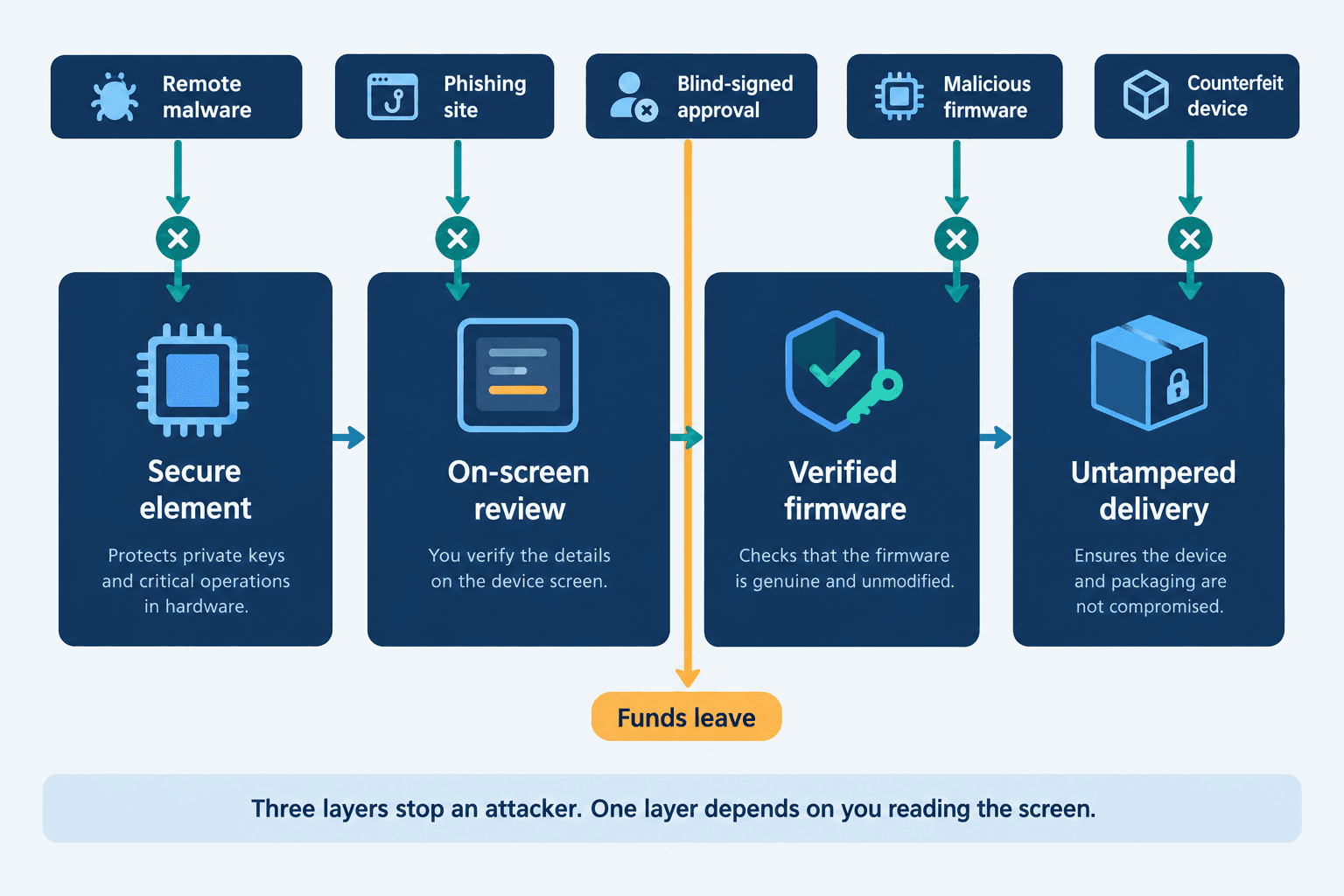
Hardware wallet security is the set of protections that keep your private keys inside an offline signing device and let you confirm each transaction before it goes on-chain. It rests on four layers: the secure element chip, on-screen transaction review, verified firmware and proof that the device reached you untampered. Only one of those four layers is about the chip. The other three are about what you see and what you trust, and that is where the money actually goes now.
How does a hardware wallet keep your private keys safe?
A hardware wallet is a dedicated offline device that stores your private key inside a chip and signs transactions on the device itself. The key never leaves the device. Your computer or phone sends an unsigned transaction over, the device signs it after you approve on its own screen, and only the finished signature comes back.
The communication method matters, too. While some hardware wallets use USB or Bluetooth, others rely on air-gapped QR signing to exchange transaction data without a direct electronic connection to the host device. This reduces exposure through the communication interface, although it doesn't eliminate the risk of signing a malicious transaction.
This separation of actions makes hardware wallets safe. A malicious actor putting a malware on your laptop can read anything your laptop knows, and with hardware wallets, your laptop never learns the private keys; hence, the malware will not find the key.
Two hardware wallet security features make this separation of action have meaning. Devices have their own screen and their own buttons, so when you confirm an unsigned transaction with pushing the buttons on the device, the host machine cannot draw anything. Also, they have a PIN number gate. Like all PIN gates, they have a "wipe-everything" feature after a preset number of wrong attempts. Meaning a stolen device does not always mean stolen wallet, unless the thief can guess your PIN. So, never choose an obvious PIN like 1234 or your birthyear, in case the thief knows you.
What is a secure element?
A secure element is a tamper-resistant chip built to keep a secret under physical attack. There are many different ways attackers can use to find a secret in a hardware devie, including:
General-purpose microcontrollers do not resist these type of attacks; secure element chips are designed, hardened, and certified for not showing any of their secrets against any of these attacks. For example they are designed to always use a constant amount of power, or some of them are designed to put random high power usage to fool anyone attacking them.
Hardware wallet vs software wallet: what actually changes?
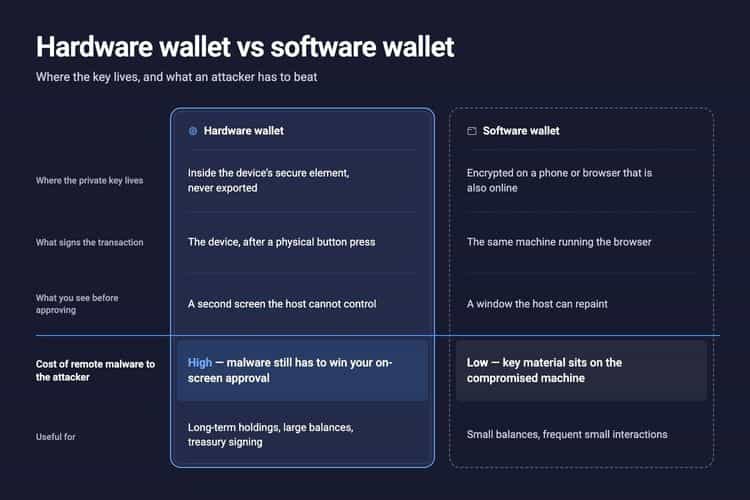
A hardware wallet does not take your keys offline. It separates the surface that holds the key from the surface that builds the transaction. The private key never leaves the device, and every transaction has to pass a screen the host computer cannot repaint. That moves the attack from your key to your eyes. That's one of the main differences between hot and cold wallets. It is notable that in the table below, the row that matters most is the fourth one. Everything else follows from it.
Are hardware wallets safe?
In one word: yes, for the job they were built for. No documented large-scale theft has come from pulling a key out of a modern hardware wallet in normal use. Almost every loss involving one traces back to what the owner approved on screen, or to a device that was already compromised before it ever arrived.
But there is a small catch, and that is if you are using a legitimate hardware wallet creator that does not send your private keys or seed phrase to the manufacturor company.
Cold wallet security is a solved problem in the narrow sense and an open one in the broad sense. The narrow sense is key custody, and the secure element chips won that. The broad sense is everything between a website and your thumb pushing the button, and that is still wide open.
Can hardware wallets be hacked?
With the device in attackers' hand and enough time, some have been. Researchers have extracted seeds from older devices built on general-purpose microcontrollers using voltage glitching, which is exactly the class of attack a secure element is designed to resist. There have been some system design faults in older wallet versions that may have been vulnerable to some attacks, and that is not on the certified secure elements. These are physical attacks that require possession of your device, so they matter for a stolen wallet and not much for a remote attacker.
Remotely, the answer is different. Nobody is breaking the chip over the internet, because they can not see it or have any access to it. They are creating the transaction and your device signs it on a whole separate level from the host that creates the transaction, only after you push the button. So, always make sure the transaction you are signing is the one you intend to. If you are still at the stage of picking a device, our guide on choosing a secure crypto wallet covers the selection criteria.
What recent hardware wallet security breaches teach us
Three incidents, three different layers, none of them a broken secure element chip:
The pattern across all three: the key stayed safe in the hardware wallet, and the funds left anyway because of a frontend hack or social engineering attack.
What is blind signing in crypto?
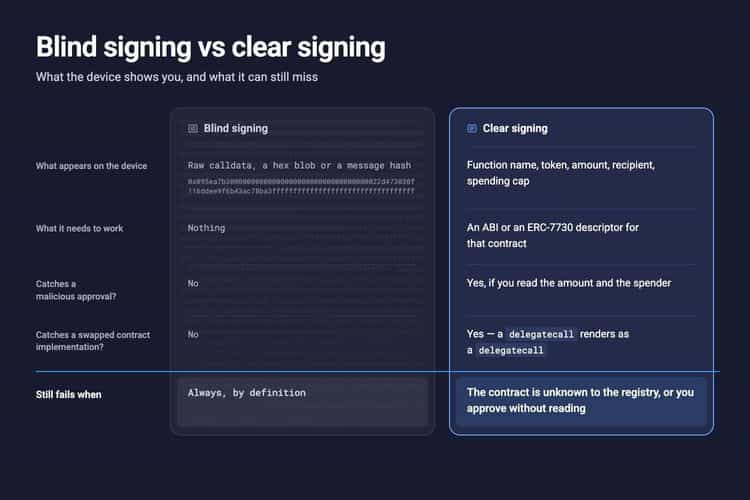
Blind signing is transaction approval in which your wallet shows you raw calldata, a hash or a hex string instead of what the transaction actually does. You confirm a payload that is not human-readable. The device still protects the key perfectly, and it still signs whatever that payload says, which may be malicious.
The reason is boring and structural, and a bit technical. A smart contract call is a function selector plus encoded arguments. Decoding that into "approve unlimited USDC for this address" requires the contract's ABI and some idea of what the function means, and a device with a small screen and no internet connection does not have either by default. Also, even if the wallet have an internet connection or a good interface on your laptop this can still happen. Many wallets get their ABI data from some sources like Etherscan and if the contract is not verified there, they cannot parse the transaction into human-readable data. EIP-712 typed data helped, because it lets a dApp send a structured message the wallet can render as labelled fields. It only helps when the dApp or contract implements it and the device supports that particular type.
Why do DeFi apps ask you to enable blind signing?
Because the contract they need you to call is not one your device knows how to decode. For the users security's sake, many wallets ship with blind signing 'off' and a setting to turn it 'on', which is an honest admission: the device is telling you it cannot verify what you are about to authorize.
Turn it on when you need it and know the dApp is legitimate and their frontend is not hacked, do the transaction, turn it off. Leaving it permanently enabled removes the only warning you get, against malicious contracts and bad actors you may not know.
How wallet drainers exploit blind signing
A wallet drainer is a kit that takes a single user signature and converts it into permission to move that user's tokens. Modern crypto wallet drainer kits are sold as a service, with the operator taking a cut of what the affiliate steals.
The signature is usually not a transfer. It is an ERC-20 token approval, or better for the attacker, a gasless permit signature under Permit (EIP-2612). A permit is an off-chain message that gives permission to a third-party. It costs no gas, it does not appear in your transaction history, and on a device without decoding it renders as a hash. Scam Sniffer's 2025 data puts Permit and Permit2 exploits at 38% of losses across drainer incidents above $1 million, with total drainer losses of $83.85 million across roughly 106,000 victims that year.
Reading the chain after the fact is a skill worth having, and we have a walkthrough on how to spot scams with on-chain data. This can help you to find scams, and beware of them.
What is clear signing, and how is it different?
Clear signing is transaction approval in which the device decodes the payload and displays the action in plain language: the function, the token, the amount and the counterparty. Blind signing shows you bytes. Clear signing shows you meaning, so an approval you did not intend looks wrong before you press confirm. In a sense, you can say it is the absolute opposite of the blind signing.
ERC-7730, the Structured Data Clear Signing Format, is the standard trying to make this general. It defines a JSON descriptor that maps a contract's function selectors and EIP-712 type hashes to human-readable labels, formatting rules and intent descriptions, published to a shared registry so any wallet can render any covered contract consistently. It is in draft status now, like all other ERCs. Its coverage depends on somebody writing and publishing a descriptor for the contract you are about to call.
That dependency is the catch nobody selling clear signing puts on the box. A registry-based approach decodes what the registry knows about and falls back to hex for everything else, which includes any contract deployed this week. Some devices decode locally from the ABI on the device rather than fetching from a registry, and hardware wallets that decode the transaction on the device, do not go dark the moment they meet a contract nobody has described yet.
The signing channel matters, too. Some hardware wallets use USB or Bluetooth, while others rely on to exchange transaction data without establishing a direct electronic connection to the host device. This also reduces exposure through the communication interface, although it doesn't eliminate the risk of approving a malicious transaction.
How to verify a hardware wallet against supply chain attacks
A supply chain attack compromises a product before it reaches you. For hardware wallets it takes two forms: a counterfeit or modified physical device, and a poisoned software dependency like the Connect Kit case. You can defend against the first completely. The second is on the vendors, and your protection there is clear signing.
Buy only from the manufacturer or an authorized reseller
Buy from the manufacturer's own store or a reseller listed on the manufacturer's site. Do not buy a hardware wallet on Amazon Marketplace, eBay, AliExpress or from a person on a forum, no matter how good the price is or how sealed it looks. A used hardware wallet is worth nothing to you and potentially everything to whoever sold it.
If a device arrives that you did not order, it is an attack. There is no legitimate reason for a manufacturer to mail you a replacement unprompted.
Spot fake or tampered hardware wallets: packaging, pre-set PINs, pre-filled recovery sheets
Check the tamper-evident packaging before you open it: a broken or resealed seal, a shrinkwrap that looks reapplied, misprinted or off-colour labelling. Photograph anything that looks wrong before you handle it further.
Then check the device itself. Stop immediately if any of these are true:
- It powers on with a PIN already set.
- The recovery sheet in the box already has words written or printed on it.
- The instructions tell you to enter an existing recovery phrase to "verify" or "migrate" your wallet.
- The setup asks you to download the companion app from a link, a QR code or a file on the box rather than from the manufacturer's domain you typed yourself.
A genuine device generates your recovery phrase itself, on first setup, and shows it to you once. A recovery phrase that existed before you did is somebody else's wallet, and they are waiting for you to fund it.
Run the device's genuine check and verify the firmware
Firmware attestation, the genuine check, is a cryptographic handshake. During manufacturing each secure element generates a key pair, and the manufacturer signs the public key with a hardware security module. When the companion app runs the check, the server sends a challenge, the chip signs it with its private key, and the server verifies both the signature and the factory attestation. A counterfeit chip has no valid attestation and fails. This can save you your whole assets, so take it seriously.
Attestation proves the secure element is authentic. It does not prove the rest of the device is. An implant added alongside a genuine chip, of the kind found soldered to the board in the 2021 mailed counterfeits, passes the check. Attestation rules out a fake chip and rules out nothing else, which is why the packaging inspection is not redundant with it.
Update firmware only from inside the official companion app, and only after the device screen shows you the version it is about to install.
Hardware wallet security best practices
These are ordered by how much damage skipping them causes.
1. Keep the recovery phrase offline and only offline. Never photograph it, never type it into anything, never store it in a password manager or a cloud note. Your BIP39 recovery phrase is the wallet; the device is just a lock on it. Write it on the card, and if the balance justifies it, buy a metal backup plate that survives a house fire. If you do lose access, what to do when you lose access to your wallet is worth reading before you need it.
2. Add a passphrase. A BIP39 passphrase is an extra word you supply at unlock time that derives a completely separate wallet from the same 24 words. Someone who finds your recovery sheet gets the wallet without it, which can hold a small decoy balance. Write the passphrase down somewhere separate from the phrase, because there is no recovery if you forget it. You can learn more about BIP39, passphrase, and recovery phrases.
3. Verify the receiving address on the device screen, character by character. Not in the browser, on the device. Check the first six and the last six at minimum. This is the single check that defeats both clipboard malware and address poisoning.
4. Review and revoke token approvals regularly. Run a token approval checker against your address, and revoke anything you no longer use, especially unlimited allowances. We explain the mechanics in our guide to review and revoke token approvals, and the habit of checking every transaction before you confirm is the other half of it.
5. Update firmware only from the official app. Never from a link in an email, a DM, a pop-up on a website or a QR code printed on packaging. There is no urgent firmware update. There are a lot of urgent-sounding phishing emails.
If you are comparing devices on these criteria rather than on price, our roundup of the most secure crypto wallets goes deeper on the hardware.
How does hardware wallet security work when you swap or bridge?
It works the same way it does for a any plain transfer. You connect the wallet to the swap app, review the route and the quote in the interface, then confirm the token, the amount and the destination on the device screen before approving. The keys stay on the hardware for the whole flow.
When you are ready, you can swap or bridge from your hardware wallet directly. If you want the mechanics of how a route gets built and priced first, we walk through how cross-chain DEX aggregators route a swap in a separate guide.
Conclusion
Hardware wallet security did its job on the layer everyone talks about, and the attacks moved to the three layers nobody puts on the box. A device that decodes what you are signing, bought from a source you can verify, running firmware you checked, protects you against the things that are actually taking money. Get those right once and the chip takes care of the rest.
Resources and Further Readings
Frequently asked questions
Check out most commonly asked questions, addressed based on community needs. Can't find what you are looking for?
Contact us, our friendly support helps!
How secure are hardware wallets?
Pretty much secure in holding the private key safe against malicious actors. The secure element chip, if certified and architectured properly, is designed to make sure your private key never reaches a hot surface, where a malicious actor can see or touch. They are also safe in case of theft, unless you choose an obvious PIN for it. But remember: you still need to make sure what transactions you are signing and approving, because you still can lose your funds if you give approvals to malicious actors.
Are hardware wallets 100% safe?
In a sense, yes they are. But nothing is actually 100% safe. They are safe against actors who want to grab your private keys from the certified secure element. But you can still get attacked by social engineering, malicious interfaces, supply chain attacks, physical theft with weak PIN, and leaked seed phrase.
What are the risks of using a hardware wallet?
The risks usually are you not being carful enough, including approving a malicious transaction you could not read, losing or exposing the recovery phrase, buying a tampered device from an unauthorized seller, installing firmware from a source that is not the official companion app, and physical loss of the device while having a weak PIN.
Can someone steal my crypto if they have my wallet address?
No. To give you an analogy, a wallet address is like you card number. You give it to other people so they are able to send funds to you. Knowing just the wallet address cannot give access to anyone to move your funds and steal them. But in a transparent blockchain like Bitcoin or Ethereum, giving out your wallet address gives out the information of you balance to whomever knows that address belongs to you. This is the only information that is leaked.
How do I turn on blind signing, and should I?
In the setting of your hardware device, there is a toggle switch that gives you the ability to turn the blind signing on and off. You should turn it on only when you are extremely sure about the transaction you are signing, and the device is not letting you sign without it. It is recommended to turn it off again immediately after the transaction, so the wallet itself can guard you against malicious transactions reaching you.
What is a clear signing wallet?
A wallet that decodes a transaction on the signing device and displays the function, token, amount and counterparty in human-readable text instead of some hex string that you cannot read. Some decode locally from the contract ABI, others fetch an ERC-7730 descriptor from a registry. Registry-based decoding falls back to blind signing default for contracts nobody has published a descriptor for.
How can I tell if a hardware wallet is fake?
There is no 100% way. But you can at least try to guard yourself against the obvious ones. Broken or resealed tamper-evident packaging, a PIN already set on first power-on, a recovery sheet with words already written on it, or setup instructions that ask you to enter an existing recovery phrase. Run the manufacturer's genuine check as well, keeping in mind that it verifies only the security element chip and not the whole board. Another important note is that if you get a wallet that you haven't ordered, it is most likely a scam!
What happens if my hardware wallet breaks?
Your assets are safe. No worries about that. The assets live on the public ledger (blockchain), not on your devie. You can always see them on live explorers and always recover them on another wallet, whether hardware or software, using your recovery phrase.
Can I swap or bridge crypto directly from a hardware wallet?
Yes. Connect the wallet to a trusted swap dApp that supports hardware wallets, review the route and quote, and approve each step on the device screen. The device signs and the keys stay on it, so you keep custody through the entire swap or bridge. You can swap or bridge from your hardware wallet on Rango.
Which hardware wallet is the most secure?
There is no single answer, because the right device depends on which chains you use and whether you want an air-gapped QR workflow or a cable. Compare on secure element certification, on-device decoding and open firmware, and see our roundup of the best cold wallets compared.